


Quran by Quranly
4.5382.00 Reviews
App Specs
- Version
- 3.0.73
- Updated On
- License
- Free
- Downloads
- 1,000,000+
- Developer
- Quranly
- Categories
- Books & Reference
- Platform
- Android, iOS
Screenshots

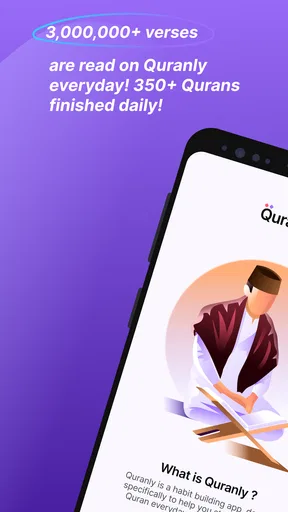

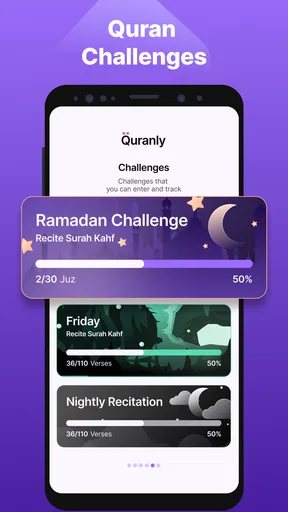
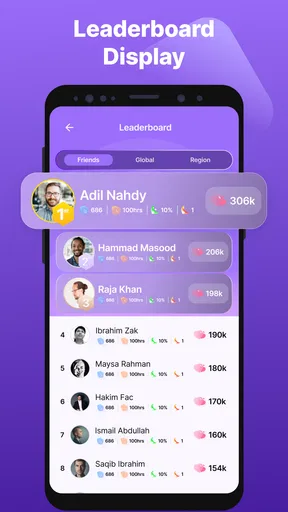
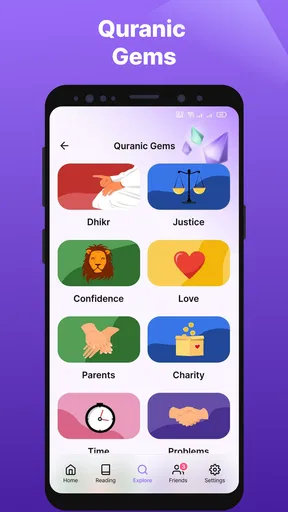
 Analysis by AppCompare
I judge a Quran reading app not only by what it puts on the screen, but by whether it fits naturally into the small, ordinary gaps of a day. Quran by Quranly is a free Books & Reference app from Quranly, built around helping readers form a steady routine. Its focus on goals and reminders makes it especially appealing if you want a gentle nudge to return to reading rather than another library of material to browse without a plan.
When a connection becomes part of the experience
Using a phone for religious reading means the experience can meet the rest of the phone: notifications, changing signal, and the temptation to switch to another task. I found it useful to think of a reading session as something to start deliberately. Open the app when you have a moment, settle on the passage or activity you want, and give yourself enough attention to read rather than treating a reminder as a task to clear.
That distinction matters if you expect to read during a commute or in a place with unreliable service. I would check the app before relying on it for a particular journey, especially if you intend to use audio, commentary, or community features. A connection can affect how smoothly an app loads content and conversations, so I would not plan an important study session around an assumption that every part will be available in every network situation.
Small sessions work better than ambitious plans
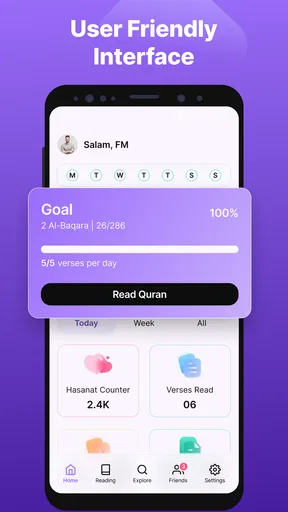
The most practical way I would use the daily goals is to set a target that feels almost too easy on an unusually busy day. A modest commitment is more likely to survive a late start, a packed lunch break, or a disrupted evening than a plan that requires a long uninterrupted block. Once the routine is established, you can decide whether to increase it; the point is to make returning to the Quran feel possible, not to turn reading into a streak you feel guilty about breaking.
A realistic routine might be to open the app after breakfast, read for a short while, and leave a longer session for a quieter part of the day. If a reminder arrives while you are at work or with family, it can be a prompt to choose a better time rather than a demand to stop immediately. That flexibility is where reminders help most: they can protect an intention without dictating the shape of the whole day.
What to do when the moment goes wrong
Phones are not calm reading spaces by default. A call, a weak connection, or an unexpected interruption can break concentration just as you reach a meaningful passage. I recommend choosing a natural stopping point when possible and returning to the text with a minute to reorient yourself, rather than rushing to make up for lost time. The app’s goals are most useful as support for a habit, not as a measure of how spiritually successful a day has been.
If something does not load as expected, I would first check whether the phone has a stable connection and try again when it does. For a session that depends on audio or shared study, it is sensible to leave a little extra time rather than starting just before you need to leave. That is a practical limitation of using a connected phone as a study companion: technical interruptions can be outside the reader’s control, and patience is sometimes part of the workflow.
Worth Reading Before You Choose

EA SPORTS FC Mobile 26 Is a Bigger Football Game, but It Takes Time

Flipboard Shows What News Apps Must Do Beyond the Feed

Switching to Android Auto Means Rethinking Your Driving Routine

Google Calendar Makes a Crowded Week Easier to Manage

Ludo King Makes the Most of the Minutes Between Plans

Baby Panda World Brings Quick Play to Modern Phones, but Its Game Library Feels Busy
Keeping mobile use intentional
Audio can suit a morning routine or a quiet evening, while reading on screen may be easier when you want to pause and consider a verse. I would choose between them based on the setting: listening is convenient when your hands are occupied, but it asks you to manage sound and stay attentive to what is playing. In a shared space, text may be the more considerate choice. Neither mode needs to replace the other; alternating can help the app fit different parts of the day.
To keep a session focused, decide what you want from it before opening the phone: a few minutes of reading, a closer look at a passage, or a brief quiz to check what you have taken in. This small choice helps separate purposeful use from tapping through every available feature. If you are reading with someone else, agree on one passage or question first; that gives a conversation somewhere to begin without making the app itself the center of the gathering.
Who will appreciate this approach
I can see this app suiting a new reader who wants structure, someone returning to a regular practice, or a confident reader who likes having goals and interactive activities alongside the text. The reminders may be particularly useful if your intention is strong but your daily schedule is unpredictable. Its rating averages 4.5 from around 18,000 ratings, and it has been installed over a million times, suggesting that this habit-focused approach has found a broad audience.
It is less compelling if you mainly want a plain digital copy with no prompts, or if you prefer to organize study entirely through printed books and personal notes. Readers seeking a particular scholarly approach should also treat commentary as a point of engagement, not a substitute for consulting trusted teachers or sources that match their tradition. For a simple reading session, the usual alternative—a basic text reader—may feel quieter and less distracting. Quranly’s appeal is the extra structure, but that same structure is not for everyone.
Free to start, with a reason to check the details
The app is free to download and is rated for Everyone. It includes in-app purchases, with listed items ranging from $4.99 to $194.99, so I would look carefully at any purchase screen and decide whether an optional addition is useful to you before paying. You do not need to treat a purchase as part of the decision to try the basic habit-building approach. The current version is 3.0.60, and the app was released on April 6, 2021; it requires Android 7.0 or later.
For data-conscious readers, the most useful habit is to be selective about when you use connection-dependent parts. If you have a limited mobile plan, use a trusted Wi-Fi connection for sessions involving audio or other content that may need to load, and avoid leaving the app open in the background when you are finished. I would also keep notifications purposeful: a reminder that supports a chosen routine is helpful, while too many alerts can make the phone feel intrusive and weaken the very habit they are meant to encourage.
A Fresh Way to Engage with the Quran
First things first, diving into Quran by Quranly feels like stepping into a modern sanctuary for spiritual growth. The interface is super clean and user-friendly, which made my navigation through the app a breeze. Whether you're a tech pro or just getting started with apps, you'll find it easy to get around.
User Interface and Experience
Let’s talk about the design because, honestly, that's what grabbed my attention first. The app features a soothing color palette that makes reading a pleasant experience. The fonts are crisp and clear, perfect for long reading sessions. I loved how intuitive everything felt — from accessing different surahs to setting reading goals. The developers definitely put a lot of thought into making it accessible for users of all ages.
Features That Stand Out
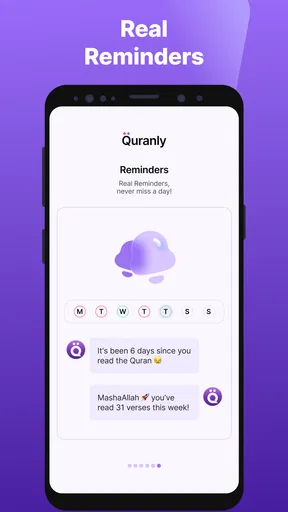
Now, onto the features. One of my favorites has to be the daily goals and reminders. It's like having a personal coach nudging me to stay on track with my readings. You can customize your goals based on your schedule, which is perfect for those busy days when you need a gentle reminder to pause and reflect for a moment.
Another standout feature is the detailed verse-by-verse commentary. This is where the app truly shines. The commentary is insightful, providing historical context and interpretations that deepen my understanding of the text. It's like having a scholar by your side, guiding you through each verse.
Interactive Elements
As someone who enjoys learning through interaction, I appreciated the quizzes and challenges sprinkled throughout the app. These elements not only test your knowledge but also encourage you to explore the Quran more thoroughly. Plus, they’re a fun way to engage with the content, especially if you’re studying with friends or family.
Audio and Recitations
For those who prefer listening, the app offers a wide array of recitations from renowned Qaris. The audio quality is top-notch, and the variety ensures you can find a reciter whose style resonates with you. I found listening to the recitations particularly soothing during my morning and evening routines.
Community and Support
One of the more unique aspects of Quran by Quranly is its community feature. You can connect with other users, share insights, and even participate in group studies. It's a fantastic way to engage with a global community of learners and share your journey.
And if you ever run into any issues or have questions, the support team is just a tap away. They're responsive and seem genuinely interested in helping users get the most out of the app.
Final Thoughts
In conclusion, Quran by Quranly offers a fresh, interactive approach to studying the Quran. It's packed with features that cater to both beginners and seasoned readers. Whether you're looking to deepen your understanding or simply want to maintain a regular reading habit, this app has something to offer.
If you're ready to embark on a more engaged spiritual journey, I'd say give this app a try. It’s a blend of tradition and technology that’s hard to resist. Ready to download? You won't regret it.
Making the choice with clear expectations
Before choosing it, I would ask myself what usually prevents me from reading: forgetting, not knowing where to begin, or wanting a more reflective study session. Quranly is strongest for the first two because its goals and prompts provide a starting point. For deeper study, its commentary and group features can add useful context and conversation, but they work best alongside the reader’s own judgment and trusted learning resources.
One useful trade-off is that an app with several ways to engage can make a short session feel richer, yet it can also invite more tapping than reading. I would resist trying to use every feature at once. A focused sequence—read a passage, consult the commentary where a question arises, then use a quiz only if it supports what you are learning—keeps the session grounded in the text rather than in the mechanics of the app.
My connectivity verdict is measured: it can be a convenient companion when your phone has a dependable connection and you want structure, audio, or interaction, but I would not make it my only plan for a setting where service is uncertain. If you need a distraction-free page above all, a printed Quran or a simpler reader may serve you better. If you want help turning an intention into a repeatable routine, Quranly offers a thoughtful place to start, provided you set realistic goals and let the technology support your reading rather than take it over.
Pros
- User-friendly interface enhances navigation.
- Customizable reading modes for better focus.
- Daily reminders help maintain reading consistency.
- Bookmark feature for easy return to verses.
- Audio recitations available in multiple voices.
Cons
- Limited customization for notification settings.
- Requires internet for some features.
- In-app purchases for advanced features.
- Occasional lag in loading audio recitations.
- Some translations lack detailed explanations.
FAQs for Quran by Quranly
What features does the Quran by Quranly app offer?
Quran by Quranly provides a comprehensive set of features including a user-friendly interface, audio recitations, multiple translations, and tafsir (exegesis). It also has bookmarking and note-taking capabilities, allowing users to keep track of their progress and insights. Additionally, it offers daily reminders and a search function to easily find specific verses.
Is Quran by Quranly suitable for beginners?
Yes, Quran by Quranly is designed to be accessible for users at all levels, including beginners. It features a simple and intuitive layout with step-by-step guidance for those new to reading the Quran. The app also provides helpful resources such as transliterations and translations to aid understanding and learning.
Can I use Quran by Quranly offline?
Yes, Quran by Quranly offers offline functionality, allowing users to download translations and audio recitations for use without an internet connection. This feature is particularly useful for those who wish to access the Quran during travel or in areas with limited connectivity.
How customizable is the Quran by Quranly app?
Quran by Quranly provides a range of customization options, including adjustable font sizes and themes to enhance readability. Users can also select from various reciters and languages for audio playback. The app’s settings allow users to tailor their experience according to personal preferences, making it versatile and user-friendly.
Is there a cost associated with using Quran by Quranly?
Quran by Quranly is available for free, though it may offer in-app purchases for additional features or content. Users can access the core functionalities without charge, but premium features or ad-free experiences might require a subscription or one-time payment. It's advisable to check the app store for specific pricing details.


